> ## Documentation Index
> Fetch the complete documentation index at: https://docs.lilith.rip/llms.txt
> Use this file to discover all available pages before exploring further.
# Tags
> Get insights about players in your game
Tags are a quick way to remind yourself - and others - of the behavior of other players.
Lilith has its own private tags system available via a [Lilith Pro](https://lilith.rip/#pricing) subscription.
We also support third-parties such as [Seraph](https://seraph.si) and [Urchin](https://urchin.gg).
This page focuses on how Tags appear in-game, for an explanation on how to get them please refer to their individual guides: [Lilith](/commands/tags), [Seraph]() and [Urchin]().
## Tab Stats
To see Tags in Tab Stats you need to add the `tags` component to your desired gamemode's layout (Bed Wars, SkyWars, etc.).
The component is added by default.
Wait for your current game to end, then a `Tags` column will appear and the tag title of any tagged players will appear.
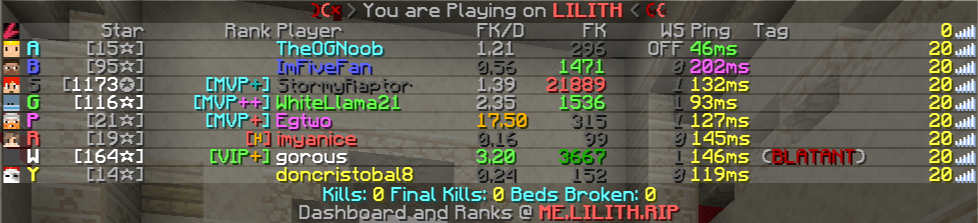 *Here `gorous` has a `BLATANT` tag.*
If you wish to automatically see additional informations about the tag, the [Tags Recap](/features/tags-recap) feature is what you're looking for.
## Chat Stats and `/sc`
If you have Chat Stats enabled Lilith will, by default, pull the requested user's tag and will display it in the chat message. To view additional information about the tag, hover the chat message.
*Here `gorous` has a `BLATANT` tag.*
If you wish to automatically see additional informations about the tag, the [Tags Recap](/features/tags-recap) feature is what you're looking for.
## Chat Stats and `/sc`
If you have Chat Stats enabled Lilith will, by default, pull the requested user's tag and will display it in the chat message. To view additional information about the tag, hover the chat message.
