> ## Documentation Index
> Fetch the complete documentation index at: https://docs.lilith.rip/llms.txt
> Use this file to discover all available pages before exploring further.
# /ltag
> Add tags to players.
## Description
This feature is only available with [Lilith Pro](https://lilith.rip/#pricing) or higher.
### Manage tags
`/ltag set [ign/uuid] [tag]`
The tag argument accepts formatting codes using the prefix `&`. For a complete list of formatting codes, refer to [this list](https://minecraft.wiki/w/Formatting_codes).
To remove a tag just use `/ltag remove [ign/uuid]`
### Shared Tags
To share your tag list you need its invite code. To get it use the `/ltag invite`.
Default Hypixel ranks and slurs are blacklisted, and all rank changes are logged for moderation purposes.
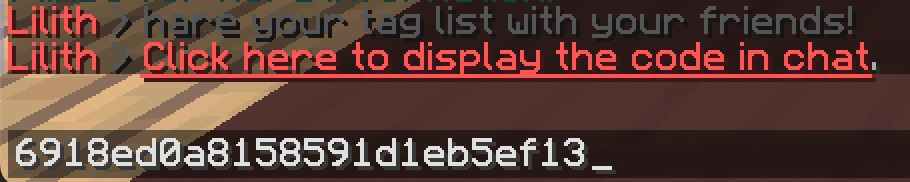 To join a tag list you need its id.
After that, run `/ltag join [id]`
## Usage
`/ltag [args]`
## Aliases
`/ltag`
## Changelog
Added shared tag lists.
Tags hotfix
Optimize building username cache for tags
Fix tags for expired gamepass accounts
Added `/ltag`.
To join a tag list you need its id.
After that, run `/ltag join [id]`
## Usage
`/ltag [args]`
## Aliases
`/ltag`
## Changelog
Added shared tag lists.
Tags hotfix
Optimize building username cache for tags
Fix tags for expired gamepass accounts
Added `/ltag`.